Tody - Smarter Cleaning
- 4.7
- Rating
- 1.00M
- Installs
- Free
- Price

 Analysis by App-foxy
Cleaning rarely fails because people do not know what needs doing. It usually fails because the work is scattered across memory, messages, sticky notes, and the familiar promise that someone will handle it later. I found Tody most useful when I stopped treating it as a simple checklist and started using it as a shared view of household maintenance. It belongs to the House & Home category, is free to download, and is designed around cleaning routines rather than general errands.
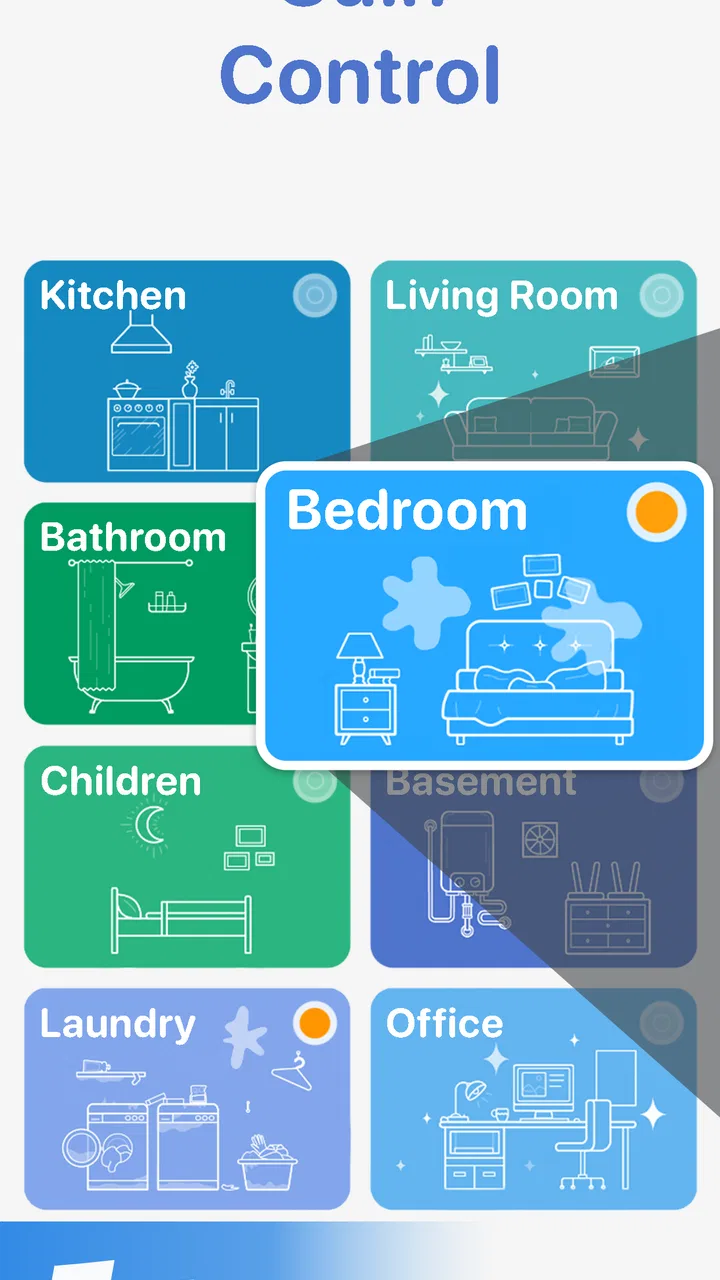
That distinction matters. A normal to-do app asks me to decide what to write, when it is due, and how urgent it feels. Tody takes a more flexible approach by helping me see which cleaning areas are becoming neglected. In practice, that makes the app feel less like a calendar full of alarms and more like a visual reminder of the home’s current state. I can open it when I have time, choose a realistic task, and avoid turning every small chore into a deadline.
How it works in a real shared household
Imagine a weekday evening in a home shared by two adults. The kitchen needs attention, the bathroom has been overlooked, and the living room is fine for another few days. A conventional list might show every task together, making the whole home look equally urgent. Tody is better suited to this situation because it separates cleaning areas and lets the user judge priorities based on how long each one has been neglected.
You May Also Like

 Blood Strike: 2.5 Anniversary
Blood Strike’s Loadouts Turn Every Drop Into a Tactical Gamble
A close look at Blood Strike’s custom loadouts: how fast access to signature weapons reshapes its battle royale rhythm, rewards preparation, and narrows the gap between fights.

 Pandora - Music & Podcasts
Pandora’s Music Is Easy to Start, but Harder to Recover
Pandora’s strength is its low-effort path from a seed to a station. Its weak spot is how much confidence it asks you to place in connection, setup, and quiet recovery.

 8 Ball Pool
 Is Built on Rivalries, Rematches, and Routine
A close look at the rivalries, rematches, shared routines, and unanswered safety questions that turn a quick pool match into a persistent mobile community.

 Samsung Music
’s Quiet Strength Is Playing What You Already Own
Its reach comes less from spectacle than from dependable access to a personal library. That simplicity is both the app’s strongest retention engine and its ceiling.

 AccuWeather: Weather Radar
AccuWeather Review: A Quick, Clear Forecast for Everyday Decisions
For everyday plans, the best forecast is the one you can understand quickly. AccuWeather makes rain timing, radar, and local conditions easy to act on, with a few trade-offs.

 Hill Climb Racing
Why Hill Climb Racing Still Turns Crashes Into One More Run
A tiny car, a bumpy hill and one more upgrade: Hill Climb Racing keeps resurfacing because its simple chaos makes every near-miss feel personal.
More From Our News Desk
View All News


I like that approach for households where schedules change constantly. If I have only fifteen minutes, I can focus on one area instead of feeling that I have failed by not completing an entire routine. A person who has more time can continue with another task, while someone arriving home late is not confronted with a rigid sequence that no longer matches reality.
The app also works well for a single person who wants structure without an aggressive productivity system. I can use it to divide a large home into manageable zones, rather than writing a huge list that becomes discouraging. The useful habit is to record recurring cleaning work when it is actually completed, then let the visual condition of each area guide the next decision.
That flexibility is one of its strongest differences from ordinary reminder apps. A reminder says, “Do this on a particular day.” A cleaning routine needs more nuance: a task may be acceptable today, overdue tomorrow, and urgent after several busy days. Tody’s central idea fits that reality better than a fixed list, although people who want exact appointments and strict time slots may prefer a calendar or task manager.
Starting with boundaries instead of copying the whole home
My advice is not to enter every possible chore during setup. Begin with the rooms and jobs that genuinely cause tension. For example, add the kitchen surfaces, bathroom cleaning, laundry-related work, and floors before worrying about occasional jobs. This creates a useful first view and avoids the common mistake of building an elaborate system that feels like another chore.
Household boundaries are especially important when the app is used on a shared device. Decide whether the device represents the whole home or one person’s responsibilities. If everyone looks at the same screen, the app should contain tasks that everyone understands. If it is mainly one person’s phone, adding another person’s private routine can create confusion rather than cooperation.
I would also separate recurring maintenance from personal reminders. Cleaning the shower belongs naturally in this app. Remembering to buy a specific birthday gift or call a contractor may be better handled elsewhere. Keeping those categories apart makes Tody easier to read and prevents the cleaning view from becoming a general-purpose task dump.
Another practical boundary is to use broad areas where that makes sense. “Kitchen” can be a useful starting point, while splitting it immediately into every cupboard, appliance, and surface may make the routine feel excessive. Later, if one part of the room repeatedly gets ignored, it can receive its own attention. This gradual setup is more sustainable than trying to describe the entire household perfectly on the first day.
The developer, LoopLoop Aps, has kept the concept focused on routine cleaning rather than turning it into a full household management suite. That focus is helpful, but it also means I would not expect the app to replace every tool a household might need. It organizes cleaning priorities; it does not automatically solve disagreements about who should do them.
Coordination without pretending a list solves everything
In a shared home, the hardest part is often not seeing the task but agreeing on ownership. Tody can make neglected areas visible, yet visibility is not the same as assignment. I found it most effective when housemates used the screen as a conversation starter: one person chooses the bathroom, another handles the kitchen, and both know what “done” means before starting.
A useful routine is to check the app during a short weekly household conversation. Instead of discussing every minor task, look for the areas that have drifted furthest from attention. Then divide only the work that is realistic for the coming days. This prevents the list from becoming a silent source of blame, particularly when one person has more free time than another.
For couples, the app can help reveal invisible work. A person who regularly wipes surfaces may feel that nothing has changed because the task disappears as soon as it is finished. Recording it creates a clearer picture of the maintenance happening over time. Still, I would avoid treating the app as a scoreboard. Cleaning frequency varies with cooking habits, pets, visitors, health, and work schedules, so a task becoming due is not evidence that someone has been careless.
For roommates, clarity matters even more. A shared cleaning view should be paired with simple agreements about supplies, standards, and exceptions. If one roommate cooks every night, the kitchen may need a different rhythm from the hallway. The app can support that discussion, but it cannot infer the reason a room needs attention or decide what is fair between people.
This is where Tody compares favorably with a group chat. Messages are useful for quick coordination, but cleaning instructions can disappear under unrelated conversation. A dedicated routine keeps the household’s maintenance visible. On the other hand, a group chat may be better for explaining that someone is away, swapping a task, or reporting a repair that is outside ordinary cleaning.
Shared devices, accounts, and practical privacy
If several people use one phone or tablet, I would treat the app as a household board rather than a personal diary. Keep entries neutral and task-focused. “Clean bathroom mirror” is clearer and less argumentative than wording that implies a particular person has failed. This small choice makes a shared screen feel cooperative.
Account boundaries deserve attention too. A household list may contain information about routines, absences, or who normally handles certain work. I would avoid adding sensitive personal notes simply because there is space for them. If the device is shared with children, guests, or temporary housemates, remember that anything displayed there can be seen by whoever opens the app.
I would also decide in advance who is allowed to change the routine. On a shared device, unrestricted editing can make the system unreliable: tasks may be removed, frequencies altered, or completed work marked again without everyone knowing why. A simple household rule—discuss meaningful changes and leave routine check-ins open to everyone—can prevent this friction.
The app is rated for Everyone, which makes its basic subject matter approachable across a household. That does not automatically make every use case suitable for every age. Younger children may need a parent or older sibling to explain the task, check safety around cleaning products, and decide which work is appropriate. The app can show that a task exists, but it should not be treated as supervision.
That age context is important because a cleaning routine can become positive when it teaches participation, but unpleasant when it becomes a punishment system. I would give younger users small, clearly described jobs and praise consistency rather than comparing their output with an adult’s. For teenagers, the app can support independence, provided the household agrees on expectations and does not use the list as a constant monitoring tool.
What the visual routine changes in everyday use
The most valuable shift is psychological. When I use a standard checklist, unfinished items look like failures. With a routine organized around cleaning condition, I can make a calmer choice: address the room that needs attention most, then stop. That is particularly useful for people who become overwhelmed by long lists or who have irregular energy.
One non-obvious benefit is that it helps with “maintenance blindness.” I may notice a visibly dirty floor but overlook less dramatic work such as wiping a high-touch surface or cleaning a bathroom fixture. By dividing the home into areas and recurring jobs, the app encourages me to look beyond whatever is most obvious at that moment.
A second useful insight is to avoid setting every task to the same rhythm. Not all cleaning work belongs on an identical cycle. Daily kitchen care, occasional floor work, and less frequent deep cleaning should feel different inside the routine. If everything becomes equally urgent, the system loses its value. I would adjust the routine gradually, based on what the home actually needs, rather than copying an ideal schedule.
A third practical use is recovery after a disrupted week. When illness, travel, overtime, or guests interrupt normal habits, I would not try to complete every neglected item immediately. I would choose the areas that affect comfort and hygiene first, then rebuild the routine over several sessions. The app is more helpful as a way back into normal maintenance than as a tool for punishing a backlog.
There is also a useful distinction between visible completion and meaningful completion. Marking a task finished can provide momentum, but the household should still define the standard. “Clean the kitchen” might mean clearing counters for one person and scrubbing appliances for another. Without a shared interpretation, the app may create the appearance of coordination while disagreements remain underneath.
Where it fits beside calendars and ordinary to-do lists
Compared with a calendar, Tody is less rigid and better aligned with work that can move by a day or two without causing a crisis. I would not use it for a scheduled inspection, a booked service visit, or a deadline that cannot move. Those belong in a calendar with a specific time and alert.
Compared with a general to-do list, it has a narrower purpose and therefore less clutter. A general list may be better if you want cleaning, shopping, bills, school tasks, and errands in one place. Tody is more appealing when the problem is specifically the repeating, easy-to-forget nature of household maintenance.
Compared with paper, it offers a living routine that is easier to update when the household changes. Paper can still be better for a visible kitchen noticeboard, especially when not everyone uses the same device. I would choose the app when the household already checks phones regularly, and paper when the main challenge is getting everyone to look at a screen at all.
Compared with a shared chat, it provides better continuity for recurring work. Chat is faster for negotiation, but it is poor at showing the long-term condition of several rooms. The strongest arrangement may be to use Tody for the routine and another communication method for exceptions, supply shortages, and task swaps.
Version, cost, and what to expect before committing
The app is currently at version 3.5.7 and supports devices running Android 8.0 or later. That makes checking device compatibility worthwhile before installing it on an older household phone. On supported hardware, the concept is easy to understand, but the real value appears only after the routine has been tailored to the home rather than left at a generic starting point.
It is free to download, which makes trying the basic workflow low-risk. In-app purchases range from $0.99 to $79.99 per item, so I would review the purchase screen carefully before paying for anything. A household should first decide whether the free experience already covers its needs, especially if the app is being considered for several people or devices.
The high average rating of 4.8 from around 21 thousand ratings, along with over one million installs, suggests that the focused approach has connected with many users. I would still interpret popularity cautiously. Someone who wants a detailed team task manager, inventory tracking, or strict accountability may find the app too specialized even if its cleaning workflow is excellent.
There are other limitations worth acknowledging. A visual priority system can be motivating, but it may not satisfy users who want extensive automation, complex dependencies, or a precise history of every action. Shared use also depends on household habits: if people do not open the app, do not agree on standards, or edit tasks casually, the routine will not remain trustworthy.
I would skip it if you dislike maintaining recurring systems altogether. The initial setup is not difficult, but any routine tool needs occasional adjustment. I would also choose a broader task manager if cleaning is only one small part of a much larger personal organization system. Tody is strongest when its narrow focus is an advantage, not a restriction.
My household verdict
After using it as a cleaning organizer, I see Tody as a thoughtful option for people who want less guilt and more awareness around household work. Its best idea is replacing a rigid “due or not due” mentality with a clearer sense of which areas are drifting out of balance. That makes it especially suitable for busy adults, couples, roommates, and families who need a shared reference point but do not want cleaning to dominate their schedules.
I would introduce it slowly: add the rooms that matter most, agree on what each task means, and use the app during a short weekly check-in. Do not load it with every possible chore, and do not turn its status into a judgment of a person. Used that way, it can make neglected work easier to notice and easier to divide.
My final recommendation is positive, with a clear condition: choose it for flexible cleaning routines, not for all-purpose household management. The free entry point and Everyone age rating make it approachable, while the focused design gives it an advantage over generic lists for recurring chores. Its weakness is equally clear—coordination still requires human agreement. For a household willing to set boundaries and communicate, that is a reasonable trade-off, and the app can become a genuinely useful part of keeping home life under control.
FAQs for Tody - Smarter Cleaning
01What is Tody - Smarter Cleaning and how does it work?
Tody is a cleaning management app designed to help users organize and maintain their cleaning routines efficiently. It works by allowing users to set up cleaning schedules, track tasks, and receive reminders. The app provides a visual overview of tasks, helping users prioritize chores and keep their homes tidy without stress.
02Is Tody suitable for both individuals and families?
Yes, Tody is designed to cater to both individuals and families. It offers customizable cleaning schedules that can be tailored to fit various household sizes and needs. Families can use the app to assign tasks to different members, encouraging collaboration and ensuring that cleaning duties are evenly distributed.
03Does Tody offer any reminders or notifications for cleaning tasks?
Tody provides smart reminders and notifications to keep users on track with their cleaning schedules. Users can set up personalized alerts for each task, ensuring they never miss a cleaning duty. These notifications can be adjusted according to the user’s preferences, helping to maintain a consistent cleaning routine.
04Can Tody be used offline, or does it require an internet connection?
Tody can be used offline, which means users can access their cleaning schedules and checklists without an internet connection. This feature is beneficial for those who may not always have access to Wi-Fi, ensuring they can manage their cleaning tasks anytime, anywhere.
05Are there any in-app purchases or subscriptions required for Tody?
Tody offers a one-time purchase model, and users are not required to subscribe to any monthly plans. However, there might be optional in-app purchases for additional features or themes. This one-time payment model provides users with full access to the app without recurring costs.
Pros
- Intuitive interface simplifies task management.
- Customizable schedules fit any lifestyle.
- Visual progress tracking boosts motivation.
- Reminders ensure tasks aren't forgotten.
- Family sharing syncs chores among members.
Cons
- Limited features in the free version.
- No offline mode; requires internet access.
- Sync issues may occur between devices.
- Lacks integration with other smart home apps.
- Reminders can be overly persistent.

Tody - Smarter Cleaning
Gallery